What do I actually want?
It’s expected that nothing suits me, because “perfect” is very personal.
I like having all the information right in front of my eyes.
I intend on taking advantage of a modern screen, with plenty of space to spare.
So my list of requirements becomes clearer:
- Display the current user and hostname
- Indicate if we’re on an SSH session
- Display the full current path, with
$HOMEabbreviated as~ - Display the date and time in ISO 8601 format
- Display current git info (branch, staged files, status relative to the remote…)
- Display the duration of the launched command, and its exit code
- Transient prompt, to avoid cluttering the output
- Make it pretty, colorful, and consistent, with nerd font icons
In the end, I realize I’m going to have to create this theme myself, because no one has exactly the same requirements and taste.
What are my options?
There’s a catch: I hate Bash/Zsh syntax with a passion.
So that immediately rules out creating an oh-my-zsh theme.
Yes, these languages are practical, but that doesn’t make them pleasant or maintainable. Worse, “one-liners” are everywhere. Yes, it’s very handy when you need to find a command you’ll reuse regularly, but no, it’s not suitable for a script of even 50 lines. Writing bash is simple. Writing maintainable bash is another story.
But that’s not the only way to render a shell prompt; two popular and mature projects catch my attention: Starship, and Oh-My-Posh.
Both support Zsh (my shell of choice) as well as many other shells. However, my choice is made on its own because only OMP explicitly supports the transient prompt on Zsh.
My Zsh prompt
After a few hours of tinkering based on the emodipt-extend prompt from the OMP theme gallery, I got a satisfactory result. Let me introduce you to yellow-frey, a 3-line yellow and orange prompt, with icons, and that (most importantly) meets all of my criteria.
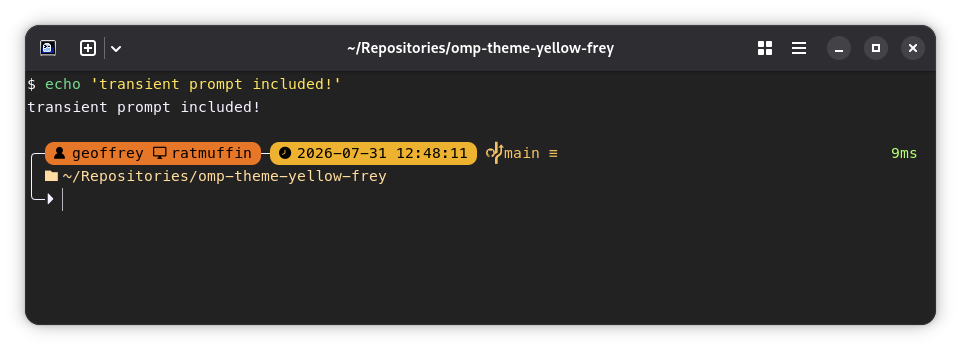
OMP’s big strength is its JSON-based segment configuration.
The documentation is clear and exhaustive, and it was simple and pleasant to use.
My Claude Code status line
In early 2026, I started using agentic programming tools more often. With several colleagues at Pictarine, the decision was made unanimously: Anthropic’s tools were simply better than the competition, whether it’s the Claude web chat or the Claude Code harness.
Except that when you have a terminal window dedicated to your agentic harness, you don’t see your zsh prompt. In fact, there are even other contextual pieces of information you’d want to display in the status line.
At first, I tried customizing my status line by hacking around, but nothing was very aesthetic or complete. Then, by chance, while browsing the OMP documentation, I noticed a Claude Code integration.
So with a bit of effort, I created my own status line for Claude Code. While at it, I might as well reuse the design produced for the shell prompt, and add harness-specific metadata… And there it is, a statusline for Claude Code:
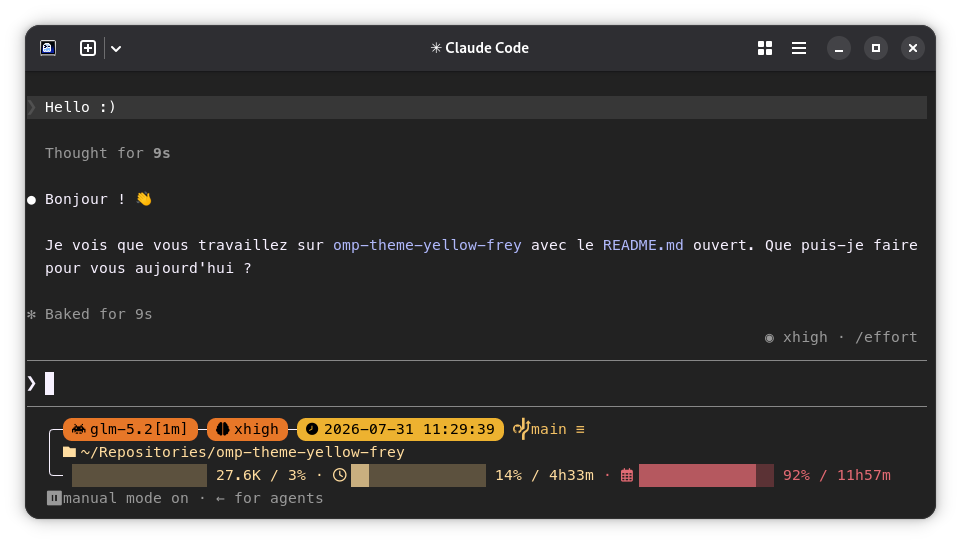
And if you pay attention to the information in this screenshot, you’ll notice a little curiosity: This statusline indicates glm-5.2 as the model. That’s not new; you can absolutely use Anthropic’s harness with third-party providers, even if you lose some official integrations.
The interesting detail here is that the usage bars for 5 hours and 7 days are filled in, even though z.ai doesn’t provide this information in their Anthropic-compatible API… But how is that possible?
I have to admit it.
I had to do something horrible.
I wrote a bash script.
More seriously, I wrote a small wrapper around the OMP call that intercepts the information provided by the harness, detects the provider, and augments the data provided in the GLM/Z.ai case with an API call to their usage endpoint. If anyone ever wants to pick this up later and add data for another provider, they’ll just need to implement two bash functions.
Aside: GLM Coder
While I’m at it, let me share a brief feedback on GLM.
For now, I’m satisfied with the performance for agentic programming. I see no difference in quality or speed compared to a Claude Opus 4.8, which was my default model from Anthropic. However, this is only my personal impression for a fairly structured use case. It’s not representative of all uses, so take it with a grain of salt.
On the other hand, for me, the ceiling of the GLM Coder Pro plan is a bit too low. I often hit the 5-hour and weekly limits at z.ai, whereas that rarely happens at Anthropic. If I had to give an estimate, I’d say the plan is about 30% shorter. For someone looking for a plan between Claude Pro and Claude Max 5x, GLM Coder Pro will probably do the trick.
WarningOn 2026-07-30, the existing GLM Coder plans were superseded.
At the same time, my plan was labeled “Legacy Plan V2”.
These new plans aren’t as attractive.
They have roughly half the limits, and a cost per credit about 2.4x higher than the plan I was able to test.
I’ll write a second article to discuss my GLM experience in more detail.
Conclusion
It was fun customizing my prompt and status bar, and I use the result daily on all my machines.
The IKEA effect probably plays a part, but I find customizing my work tools very rewarding. Well, within reason. I haven’t yet deemed it viable to create a dotfiles collection that covers my entire work environment.
I recommend curious people experiment with oh-my-posh, even if it means starting from an existing base like I did. If my theme picks your curiosity, the installation instructions and code are on Github. The project is MIT licensed, so anyone can freely use, study, modify, and redistribute its content.